React Server Components (RSC) in Next.js: Streaming and Suspense
April 1, 2026 | 11 minutesIn This Post
React Server Components (RSC) changed how React applications render. Instead of shipping all your component code to the browser and rendering everything client-side, server components run on the server and send rendered HTML to the client with zero JavaScript overhead.
But the real power comes from combining RSC with streaming and Suspense. Together, they let you progressively send parts of a page to the browser as they become ready, eliminating the all-or-nothing rendering model that made server-rendered pages feel slow.
This post covers how streaming and Suspense work in the Next.js App Router, practical patterns for using them effectively, and the mental model that makes it all click.
How Server Components Work
In the Next.js App Router, every component is a server component by default. Server components:
- Run only on the server
- Can directly access databases, filesystems, and environment variables
- Ship zero JavaScript to the client
- Can be
asyncfunctions thatawaitdata
1// This is a server component — it runs on the server only
2export default async function UserProfile({ userId }: { userId: string }) {
3 const user = await db.users.findById(userId);
4
5 return (
6 <div>
7 <h1>{user.name}</h1>
8 <p>{user.bio}</p>
9 </div>
10 );
11}
Client components are opted into with the "use client" directive. They run on both server (for initial HTML) and client, and support hooks, event handlers, and browser APIs.
1"use client"; 2 3import { useState } from "react"; 4 5export function LikeButton() { 6 const [liked, setLiked] = useState(false); 7 8 return ( 9 <button onClick={() => setLiked(!liked)}> 10 {liked ? "Liked" : "Like"} 11 </button> 12 ); 13}
The key insight is that server and client components compose together. A server component can render a client component, passing server-fetched data as props:
1// Server component
2export default async function Page() {
3 const posts = await db.posts.findMany();
4
5 return (
6 <div>
7 <h1>Blog</h1>
8 {/* Client component receives server data as props */}
9 <SearchablePosts posts={posts} />
10 </div>
11 );
12}
Streaming and Suspense
The Problem with Waterfall Rendering
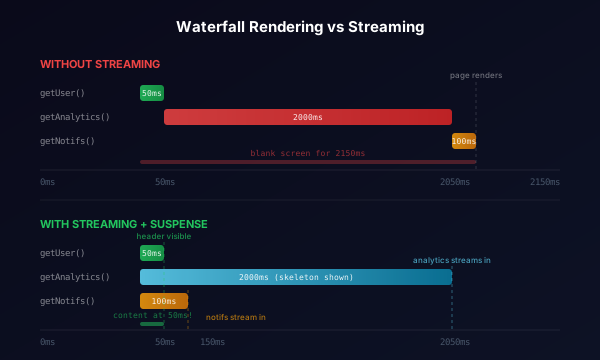
Without streaming, the server has to finish rendering the entire page before sending anything to the browser. If your page has three data fetches and one of them is slow, the user stares at a blank screen until the slowest fetch completes:
1export default async function Dashboard() {
2 // These run sequentially — each one blocks the next
3 const user = await getUser(); // 50ms
4 const analytics = await getAnalytics(); // 2000ms
5 const notifications = await getNotifications(); // 100ms
6
7 return (
8 <div>
9 <Header user={user} />
10 <AnalyticsPanel data={analytics} />
11 <NotificationFeed items={notifications} />
12 </div>
13 );
14}
In the example above, the user waits ~350ms before seeing anything. The header and notifications are fast, but they're held hostage by the analytics query.
How Suspense Enables Streaming
Streaming solves this by letting the server send parts of the page as they're ready. The mechanism is React's Suspense component.
When the server encounters a Suspense boundary around an async component, it:
- Renders the fallback immediately and sends it to the browser
- Continues rendering the rest of the page
- When the async component finishes, streams the result to the browser
- React swaps the fallback for the real content, with no full-page reload
1import { Suspense } from "react";
2
3export default async function Dashboard() {
4 const user = await getUser(); // 50ms — fast, render immediately
5
6 return (
7 <div>
8 <Header user={user} />
9
10 <Suspense fallback={<AnalyticsSkeleton />}>
11 <AnalyticsPanel /> {/* 2s — streams in when ready */}
12 </Suspense>
13
14 <Suspense fallback={<NotificationSkeleton />}>
15 <NotificationFeed /> {/* 100ms — streams in quickly */}
16 </Suspense>
17 </div>
18 );
19}
Now the user sees the header almost instantly, the notification feed appears ~100ms later, and the analytics panel streams in after 2 seconds. Each section is independent.
How Streaming Works Under the Hood
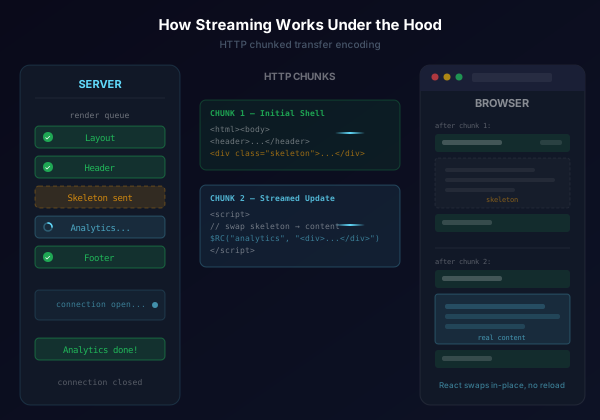
When Next.js streams a response, the HTML is sent in chunks:
-
Initial chunk: The shell of the page including the layout, any synchronously rendered content, and any Suspense fallbacks. The browser can start painting immediately.
-
Subsequent chunks: As each Suspense boundary resolves, the server sends a
<script>tag that contains the rendered HTML and instructions for React to swap it into the right place in the DOM.
This uses HTTP chunked transfer encoding. The connection stays open while the server continues rendering, and each chunk is flushed as soon as it's ready.
The browser doesn't wait for the full response. It processes each chunk as it arrives, progressively building the page. From the user's perspective, content appears piece by piece rather than all at once.
Patterns for Effective Streaming
Parallel Data Fetching
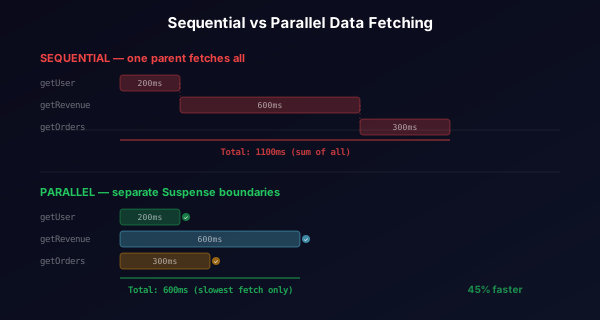
Move data fetching into the components that need it. This lets React fetch in parallel instead of sequentially:
1// Instead of fetching everything in the parent:
2async function Dashboard() {
3 return (
4 <div>
5 <Suspense fallback={<Skeleton />}>
6 <UserCard /> {/* fetches its own data */}
7 </Suspense>
8 <Suspense fallback={<Skeleton />}>
9 <RevenueChart /> {/* fetches its own data */}
10 </Suspense>
11 <Suspense fallback={<Skeleton />}>
12 <RecentOrders /> {/* fetches its own data */}
13 </Suspense>
14 </div>
15 );
16}
17
18// Each component owns its data:
19async function UserCard() {
20 const user = await getUser(); // runs in parallel with other components
21 return <div>{user.name}</div>;
22}
All three fetches start simultaneously because they're in separate Suspense boundaries. The total wait time is the duration of the slowest fetch, not the sum of all fetches.
Nested Suspense Boundaries
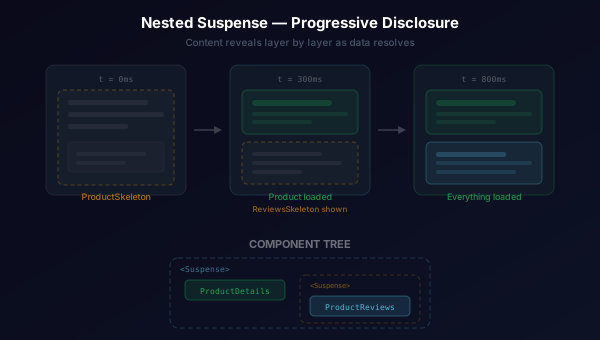
Suspense boundaries can nest. This gives you fine-grained control over what loads together and what loads independently:
1export default function ProductPage({ productId }: { productId: string }) {
2 return (
3 <div>
4 <Suspense fallback={<ProductSkeleton />}>
5 <ProductDetails id={productId} />
6
7 {/* Nested Suspense — reviews load after product details */}
8 <Suspense fallback={<ReviewsSkeleton />}>
9 <ProductReviews id={productId} />
10 </Suspense>
11 </Suspense>
12 </div>
13 );
14}
The outer boundary shows ProductSkeleton until ProductDetails resolves. Once it does, the product details appear and ReviewsSkeleton shows while reviews are still loading. This creates a natural progressive disclosure.
The loading.tsx Convention
Next.js has a file-based shortcut for Suspense. A loading.tsx file in a route segment automatically wraps that segment's page.tsx in a Suspense boundary:
app/
  dashboard/
    loading.tsx    ← Suspense fallback for this route
    page.tsx       ← The actual page content
    analytics/
      loading.tsx  ← Separate fallback for this nested route
      page.tsx
1// app/dashboard/loading.tsx
2export default function DashboardLoading() {
3 return (
4 <div className="dashboard-skeleton">
5 <div className="skeleton-header" />
6 <div className="skeleton-grid">
7 <div className="skeleton-card" />
8 <div className="skeleton-card" />
9 <div className="skeleton-card" />
10 </div>
11 </div>
12 );
13}
This is equivalent to wrapping the page in <Suspense fallback={<DashboardLoading />}> but without any changes to the page component itself. It's useful for route-level loading states.
For more granular control within a page, use Suspense directly.
Grouping Related Content
Not everything needs its own Suspense boundary. Group related content that should appear together:
1// These should load together — don't wrap each one separately 2<Suspense fallback={<ArticleSkeleton />}> 3 <ArticleHeader /> 4 <ArticleBody /> 5 <ArticleFooter /> 6</Suspense> 7 8// These are independent — separate boundaries make sense 9<Suspense fallback={<CommentsSkeleton />}> 10 <Comments /> 11</Suspense> 12<Suspense fallback={<RelatedSkeleton />}> 13 <RelatedArticles /> 14</Suspense>
The rule of thumb: if a user would be confused seeing one piece without the other, group them in the same boundary.
Skeleton Design
Skeletons are the fallback UI that appears while content is streaming. Good skeletons reduce perceived loading time by giving users a preview of the layout.
Effective skeletons:
- Match the layout of the content they replace. Same heights, widths, and spacing.
- Avoid layout shift. When the real content swaps in, nothing should jump around.
- Use subtle animation. A gentle pulse or shimmer signals that content is loading without being distracting. Don't forget to respect user preferences around animations, though.
- Don't overdo detail. A few gray rectangles in the right shape are better than a pixel-perfect mock of the final content.
1function CardSkeleton() {
2 return (
3 <div className="card-skeleton">
4 <div className="skeleton-image" />
5 <div className="skeleton-line wide" />
6 <div className="skeleton-line medium" />
7 <div className="skeleton-line short" />
8 </div>
9 );
10}
1.skeleton-line { 2 height: 16px; 3 border-radius: 4px; 4 background: linear-gradient( 5 90deg, 6 rgba(255, 255, 255, 0.06) 25%, 7 rgba(255, 255, 255, 0.12) 50%, 8 rgba(255, 255, 255, 0.06) 75% 9 ); 10 background-size: 200% 100%; 11 animation: shimmer 1.5s ease infinite; 12} 13 14@keyframes shimmer { 15 0% { background-position: 200% 0; } 16 100% { background-position: -200% 0; } 17}
Common Mistakes
Wrapping Everything in Suspense
Adding a Suspense boundary around every component creates visual noise. Users see dozens of loading states popping in at different times instead of a coherent page loading progressively. Be intentional about where you draw the boundaries.
Forgetting That Server Components Can't Use Hooks
This is the most common error when starting with RSC. Server components can't call useState, useEffect, or any hook. If you need interactivity, extract that part into a client component:
1// Server component fetches and renders
2export default async function CommentSection({ postId }: { postId: string }) {
3 const comments = await getComments(postId);
4
5 return (
6 <div>
7 <h2>Comments ({comments.length})</h2>
8 {comments.map(comment => (
9 <Comment key={comment.id} {...comment} />
10 ))}
11 {/* Client component handles the form interaction */}
12 <AddCommentForm postId={postId} />
13 </div>
14 );
15}
Sequential Fetches in a Single Component
If one component needs multiple pieces of data, fetch them in parallel with Promise.all or Promise.allSettled:
1async function Dashboard() {
2 // Parallel — takes as long as the slowest fetch
3 const [user, stats, alerts] = await Promise.all([
4 getUser(),
5 getStats(),
6 getAlerts(),
7 ]);
8
9 return (
10 <div>
11 <UserHeader user={user} />
12 <StatsGrid stats={stats} />
13 <AlertBanner alerts={alerts} />
14 </div>
15 );
16}
Not Providing Meaningful Fallbacks
An empty div or a generic spinner as a fallback is a missed opportunity. Skeleton screens that match the eventual layout reduce perceived loading time and prevent layout shift. Invest the time to build proper skeletons for your Suspense boundaries.
When Not to Stream
Streaming isn't always the right choice. It doesn't make sense in the scenarios below.
- Static pages: If your page doesn't fetch data at build time or runtime, there's nothing to stream. Use static generation instead.
- Very fast data fetches: If all your data loads in under 100ms, the overhead of Suspense boundaries and skeletons adds complexity without a noticeable UX improvement. Just render synchronously.
- SEO-critical content above the fold: Search engines handle streamed content well now, but if you're concerned, make sure your most important content is in the initial render, not behind a Suspense boundary.
- Sequential dependencies: If component B literally can't render without data from component A, wrapping B in Suspense won't help. You still need to wait for A.
Performance Considerations
Streaming with RSC gives you several performance wins by default.
- Reduced Time to First Byte (TTFB): The server starts sending HTML before it finishes rendering everything.
- Reduced bundle size: Server components ship zero JavaScript. Only client components add to the bundle.
- Progressive rendering: Users see and can interact with fast parts of the page while slow parts are still loading.
- Automatic code splitting: Client components are automatically code-split. The browser only downloads the JavaScript for components that are actually on the page.
But watch out for:
- Too many Suspense boundaries: Each boundary adds a small overhead for managing the streaming chunks and DOM swaps.
- Large component trees in a single boundary: If a Suspense boundary wraps a huge component tree, the entire tree has to finish before anything inside it renders. Break it up if parts are independent.
- Client component creep: It's easy to add
"use client"to fix a quick error instead of restructuring. Over time this can balloon your client bundle.
Wrapping Up
React Server Components with streaming and Suspense represent a shift in how we think about rendering. Instead of the binary choice between "render everything on the server" or "render everything on the client," you get granular control over what renders where and when.
The mental model is straightforward:
- Default to server components
- Add
"use client"only when you need interactivity or browser APIs - Wrap slow async components in
Suspensewith skeleton fallbacks - Push data fetching down to the components that need it
For more on React and Next.js patterns, check out View Transitions in React, Next.js, and Multi-Page Apps.