Engineering case study
Bluetooth Service Analyzer
A browser-based BLE inspection tool showing advertised services, accessible GATT services, and characteristic capabilities.
Software engineer, designer
- JavaScript
- Web Bluetooth
- HTML
- CSS
- GitHub Pages
I built the Bluetooth Service Analyzer to explore what a web browser can learn about nearby Bluetooth Low Energy devices. Finding a device in the browser's picker is only the first step. You still need to connect, find out which services the browser can access, and figure out what the data means.
The analyzer lets you work through that process with your own devices. You can see the services a device advertises, inspect the services available after connecting, and read values such as a model number, firmware version, or battery level when the device exposes them.
Try the analyzer or explore the source.
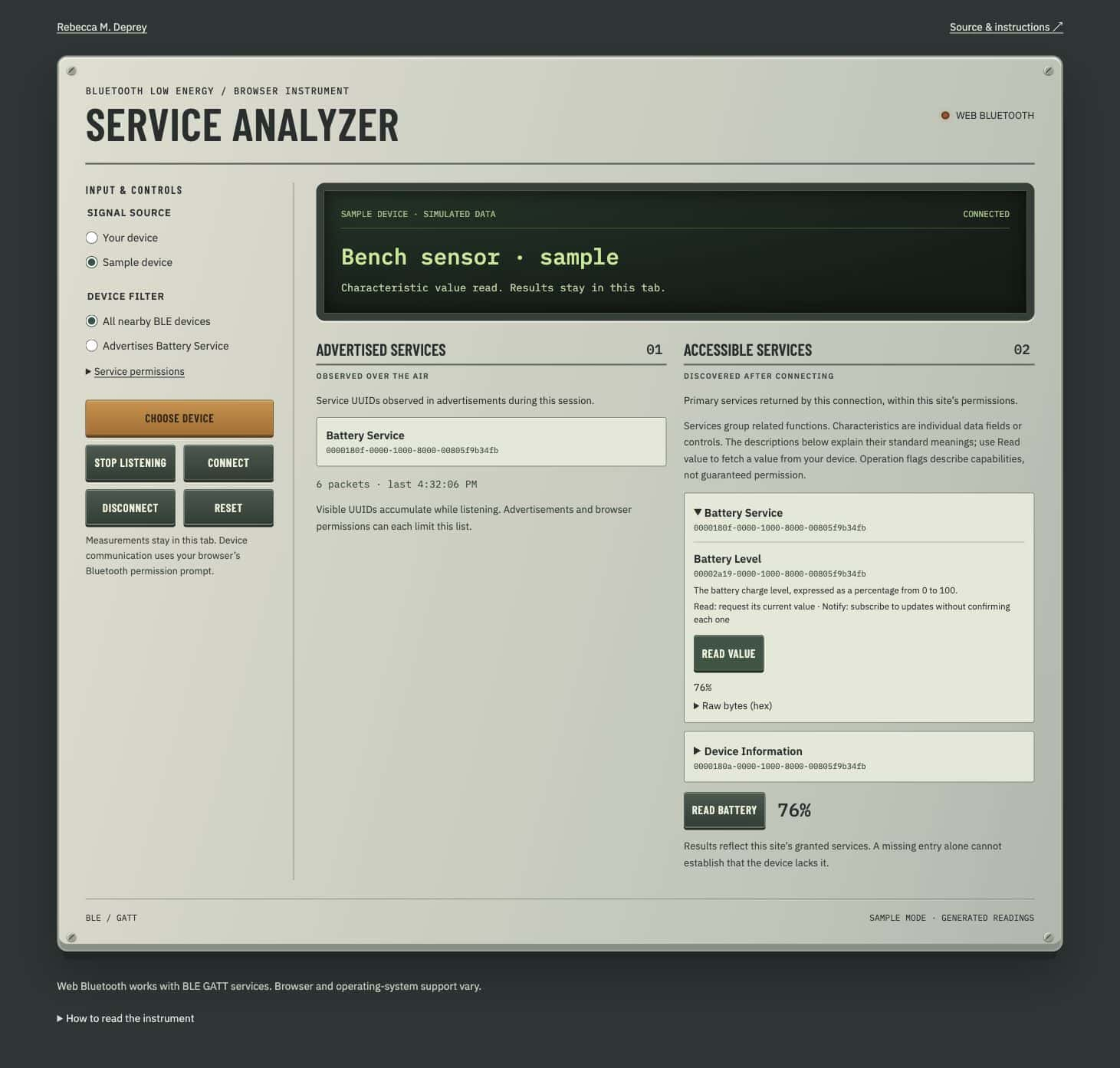
Exploring a device's services
I split the results into two panels because what a device advertises isn't necessarily the same as what you can access after connecting. The first panel shows service UUIDs received in advertisements. The second shows the primary GATT services the browser can access through the connection. Browser permissions can limit both lists, so an empty panel doesn't necessarily mean the device has nothing to offer.
Expanding a service shows its characteristics: the individual data fields or controls within that service. To make the results easier to understand, I added names and descriptions for common characteristics and for characteristics that support reading, a Read value button fetches the current value. The app decodes known formats, including device information strings, battery percentages, and product identifiers, and lets you inspect the raw bytes too. If the format isn't recognized, it shows the bytes without guessing what they mean.
You can start with all nearby BLE devices or narrow the picker to devices advertising Battery Service. If your device uses other services, you can add their UUIDs from its documentation and choose the device again to request access.
Making the results easier to understand
One of the tricky parts of working with Web Bluetooth is that support varies across browsers and operating systems. For example, a browser might let you connect to a device but not listen for its advertisements. Also, a successful connection doesn't guarantee that the site has permission to access the services you're interested in.
I wanted the interface to make those differences clear so that users can understand what part of accessing the device isn't working. It reports browser support, advertisement listening, and connection results separately, with guidance about what to try next. Read errors appear beside the characteristic so you can tell which operation failed.
I also added a sample device so you can try the app without compatible hardware. It advertises Battery Service and exposes both Battery Service and Device Information after connecting. The readings are labeled as simulated, but they go through the same inspection and reading logic as a real device.
Building the interface
For the design, I wanted the app to feel like an old electronic test instrument. I used a metal faceplate, a recessed green display, and buttons that look like physical controls. Underneath that styling, the interface uses native buttons, radio inputs, and expandable sections for keyboard access.
The app is built with JavaScript modules and hosted on GitHub Pages. Device readings stay in the current tab. When you reset or switch devices, the app clears the previous readings and stops its advertisement listeners. It also ignores results from earlier operations that finish after a reset, so data from one device can't show up under another.
Tests cover the parts that are easy to get wrong: permissions, canceled selections, unavailable advertisement listening, value decoding, failed reads, and disconnects or resets while an operation is still running.