Engineering case study
JSON Translator & Tone Transformer
A local-first AI translation tool for i18n files. Translation across 200 languages runs on-device, while an optional tone transformer helps teams match their brand voice.
Software engineer, designer
- Typescript
- Next.js
- Web Workers
- transformers.js
- Xenova/nllb-200-distilled-600M AI machine translation model
- Anthropic API
- franc natural language detector
JSON Tools is a free in-browser JSON translator and tone transformer for i18n files. It helps dev teams localize copy faster without per-request API costs, and keeps translations consistent with a brand's voice.
Localization libraries like react-i18next store translated strings as flat JSON files — one per language, with the same keys and translated values:
1// en.json
2{
3 "Title": "Hello, world!",
4 "Description": "A starter website"
5}
1// es.json
2{
3 "Title": "¡Hola Mundo!",
4 "Description": "Un sitio web de inicio"
5}
Translating dozens of values across multiple languages by hand with tools like Google Translate is tedious, and keeping those translations consistent with a brand's voice is a separate challenge entirely. JSON Tools tackles both problems: it translates JSON values between languages and transforms their tone to match a target brand voice.
Architecture Decision: Local-First Translation
I built the translation path around an in-browser model to explore how far client-side AI could go in a product that would typically send every request to a server. As more applications process sensitive material with AI, I am particularly interested in architectures that keep user data on the user's device without giving up useful model capabilities.
For translation-only workflows, the JSON content never needs to leave the browser. Running inference locally also removes the need to manage translation API keys or absorb per-token and per-request costs, which allowed me to offer translation for free. Avoiding a network round trip also makes repeat translation work faster once the model is available locally.
The tradeoff is that model loading and inference require meaningful browser resources. I moved that work into a Web Worker so it runs outside the main UI thread. The browser can continue accepting input, rendering progress, and responding to user interactions while the worker loads the model and translates the file.
JSON Translation: Convert Values Between 200 Languages
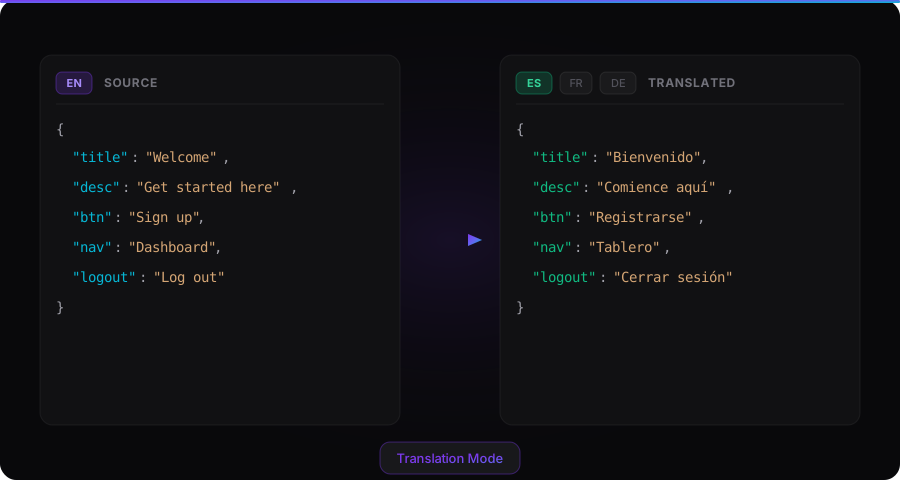
The translation mode accepts a flat JSON file, detects its source language using the franc library (with support for 187 languages), and translates every value to one or more target languages. Users can correct the detected language if franc gets it wrong, which is more likely with smaller files.
Translations are powered by the Xenova/nllb-200-distilled-600M model, which supports 200 languages and runs entirely in the browser via transformers.js. A Web Worker isolates model loading and inference from the main thread so the interface remains responsive throughout the translation.
The model is generally accurate but can take creative liberties — translating "Hello" to Spanish, for example, sometimes returns "Hola, ¿que pasa?" (translates to "Hello, what's up?") instead of just "Hola." Users should review translations before shipping them.
The browser loads a quantized version of the NLLB model to reduce its client-side footprint. The application detects the source language automatically, lets users correct that detection, supports multiple target languages in one translation run, and packages the resulting language files into a downloadable ZIP without sending them to a server.
Tone Transformation: Match Your Brand Voice Across Languages
The tone transformer mode rewrites JSON values to match a specific voice or register using the Anthropic API (Claude). It's useful when a codebase already has copy that works, but the tone needs to shift — say, from blunt error messages to supportive ones, or from marketing-speak to technical documentation.
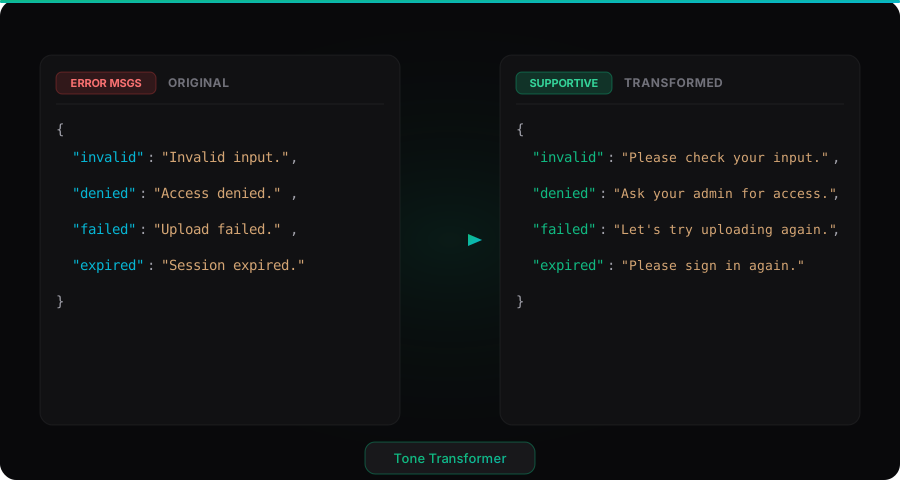
The tool includes four built-in presets (Neutral to Friendly, Casual to Professional, Marketing to Technical, and Error Message to Supportive). Users can also write a custom tone description for more specific needs. Beyond tone direction, users can define a glossary of terms that must appear exactly as written, a list of banned phrases with optional replacements, and additional style rules. These settings can be exported and imported as a style guide JSON file, making it easy to share a brand voice configuration across a team.
Results appear in a side-by-side editor or a diff view that shows each change alongside the AI's reasoning. Large files are processed in batches of 30 entries, and the tool preserves interpolation variables and HTML tags throughout.
Quality Guardrails
The tone transformation path uses a stricter contract than an open-ended rewrite. The model is instructed to preserve JSON keys, interpolation variables, HTML tags, and the original meaning while returning parseable JSON. Users can define glossary terms that must remain exact, phrases that must not appear, preferred replacements, and additional style rules. Those constraints can be exported and imported as a reusable style guide.
Large transformations are divided into 30-entry batches and merged back into one result. The API validates incoming JSON, handles malformed model responses, and strips accidental Markdown fencing before parsing. The UI provides both an editable two-column result and a unified diff so users can inspect what changed and why before downloading the transformed file.
I added Vitest coverage around batch splitting and merging, prompt construction, glossary and banned-phrase constraints, Markdown-fence cleanup, diff generation, language-code handling, and the reducer that coordinates the multi-step tone workflow. These tests protect the transformation contract and state transitions most likely to introduce silent localization errors.