Retrieval Is Not One Thing
February 17, 2026 | 11 minutesIn This Post
I built a small app that compares three ways of searching a document: BM25 (lexical search), vector search (semantic embeddings), and Gemini 3 Flash used as a full-context search engine.
The point isn't that one of these "wins." The point is that they solve different problems. In an agentic workflow, they complement each other. When you treat them as interchangeable, you get weird results. When you orchestrate them intentionally, you get a more reliable system.
The Three Modes of Search
BM25: Literal, Deterministic, Fast
BM25 answers the question: where in this document do these words appear?
It doesn't understand meaning and it doesn't paraphrase. It matches tokens and ranks them.
BM25 works well for exact quotes, character names, repeated phrases, consistency audits, and "find the line where..." type searches.
For example, if you search for "we cannot afford this", BM25 finds the literal phrase quickly (within milliseconds) and ranks matches consistently.
Vector Search: Meaning Without Words
Vector search answers a different question: what passages are semantically similar to this idea?
It doesn't need literal word overlap. If you search for courage in the face of fear, the document might never use the word "courage," but it could contain something like "She stepped forward even though her hands were shaking."
Vector search improves recall because it finds ideas, not just words. The tradeoff is that it can retrieve things that are "kind of" similar but not actually relevant.
Gemini as Search: It Works, but It's Doing Two Jobs at Once
You can also use Gemini 3 Flash (or a similar LLM) as a search engine by passing it the full document and asking it to find relevant excerpts:
1const prompt = ` 2Find excerpts relevant to "${query}". 3Return verbatim quotes. 4Document: 5${doc} 6`;
This works, but it re-reads the entire document on every query, which is slower and more expensive. It can also omit literal matches or return "verbatim" quotes that aren't actually verbatim. Gemini is a reasoning engine, and treating it like a search engine increases the surface area for failure.
Concrete Comparisons
Here are a few examples that show how these approaches differ in practice.
Exact Quotes
If you search for "we cannot afford this", BM25 is the best option. It's built for literal matching and ranking. Vector search can retrieve it, but it might rank paraphrases higher. Gemini might quote correctly, but it can also paraphrase or miss one instance.
Characters Appearing Together in a Passage
If you search for Dorothy AND Scarecrow, BM25 is the strongest choice for finding literal co-occurrence. It excels when the names appear literally and you can use AND semantics. Vector search isn't designed for "both terms present" constraints. Gemini can reason about scenes where both characters are present, but it has to scan the whole document unless you retrieve first.
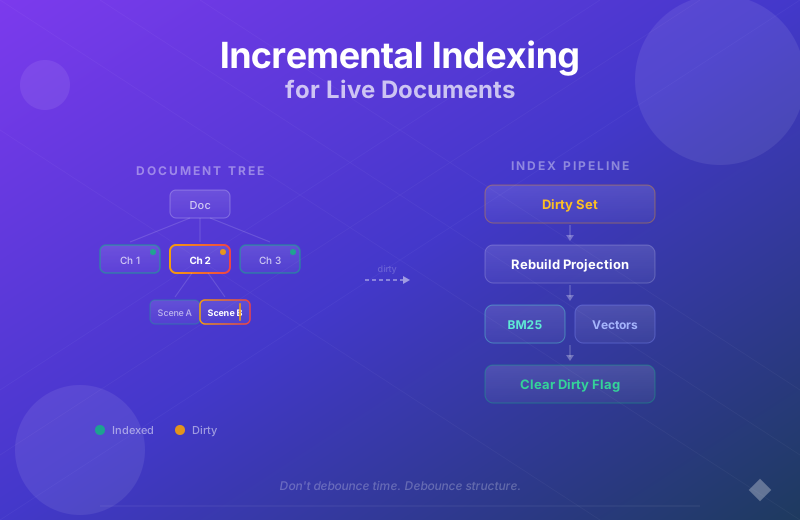
A practical upgrade is to group results by scene or structural node, so "co-occurrence" becomes "both appear in the same scene node" instead of just the same chunk.
Semantic Similarities and Themes
If you search for courage in the face of fear, vector search is the best fit. BM25 fails unless those exact words show up. Vector search will retrieve passages about implied bravery and related language. Gemini can also do this, but it'll be slower if it's scanning the full document.
Repetition Audits
If you want to know how many times a phrase like ruby slippers appears, BM25 is the right tool. It gives you exact matches with consistent ranking.
Conceptual Search with Evidence
For a question like Where does Dorothy start to doubt herself?, the best approach is a hybrid. Vector search is good at surfacing candidate passages, and Gemini is good at analyzing those passages. Asking Gemini to both find and analyze in one go is where things get unreliable.
The Real Pattern: Orchestration
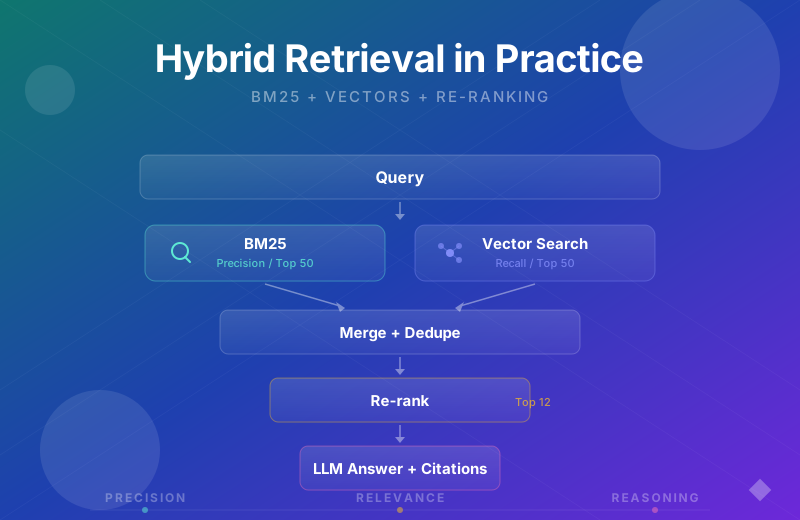
These systems are layers, not rivals. A solid agentic workflow looks like:
- Retrieve candidates with BM25 (precision)
- Expand or rerank with vector search (recall)
- Analyze with Gemini using only the retrieved evidence (reasoning)
How the Layers Fit Together
High-Level Pipeline
Separating Search from Reasoning
Example Workflow: "Dorothy + Scarecrow together" + "courage in the face of fear"
Example Code
The companion app implements all three search modes. Here are the important parts, restructured so you can adapt them to your own project.
BM25 Retrieval (Lexical)
SQLite's FTS5 extension gives you BM25 scoring for free. You create a virtual table, insert your chunks, and query with MATCH:
1import Database from 'better-sqlite3'; 2 3const db = new Database('demo.db'); 4 5// Create the FTS5 virtual table. 6// docId is UNINDEXED — stored for filtering, but not searchable. 7db.exec(` 8 CREATE VIRTUAL TABLE IF NOT EXISTS chunks_fts USING fts5( 9 docId UNINDEXED, 10 text, 11 tokenize = 'unicode61' 12 ); 13`); 14 15// Insert chunks during indexing 16function insertChunk(docId: string, text: string) { 17 db.prepare('INSERT INTO chunks_fts (docId, text) VALUES (?, ?)').run(docId, text); 18}
The query is where the interesting bits are. FTS5's built-in bm25() function handles relevance scoring, but you can layer on an exact-phrase bonus so literal matches rank higher than partial token hits:
1const STOP_WORDS = new Set([ 2 'a', 'an', 'the', 'is', 'are', 'was', 'were', 'in', 'on', 'at', 3 'to', 'for', 'of', 'with', 'and', 'but', 'or', 'not', 'it', 4 // ... ~80 common English words 5]); 6 7function sanitizeFts5Query(query: string): string { 8 return query 9 .replace(/[^\w\s]/g, '') 10 .split(/\s+/) 11 .filter(Boolean) 12 .map((t) => t.toLowerCase()) 13 .filter((t) => !STOP_WORDS.has(t)) 14 .map((term) => `"${term}"`) 15 .join(' '); 16} 17 18function searchBM25(docId: string, query: string) { 19 const ftsQuery = sanitizeFts5Query(query); 20 if (!ftsQuery) return []; 21 22 const phrase = query.replace(/[^\w\s]/g, '').trim().toLowerCase(); 23 24 // bm25() returns negative values (more negative = more relevant). 25 // Subtract 5.0 when the original phrase appears as a substring 26 // so exact phrase matches always rank higher. 27 return db.prepare(` 28 SELECT text, 29 bm25(chunks_fts) - (CASE WHEN instr(lower(text), ?) > 0 30 THEN 5.0 ELSE 0.0 END) AS score 31 FROM chunks_fts 32 WHERE docId = ? AND chunks_fts MATCH ? 33 ORDER BY score ASC 34 LIMIT 10 35 `).all(phrase, docId, ftsQuery); 36}
Stop-word filtering matters here. Without it, a query like "where is the house" would match on is and the across the entire corpus, drowning out the meaningful terms.
Vector Search (Semantic Recall)
For vector search, you need two things: an embedding model and a vector store. The companion app uses Gemini's embedding model and LanceDB for the vector store.
Generating embeddings with the Gemini SDK:
1import { GoogleGenerativeAI } from '@google/generative-ai';
2
3const genAI = new GoogleGenerativeAI(process.env.GEMINI_API_KEY!);
4const model = genAI.getGenerativeModel({ model: 'gemini-embedding-001' });
5
6// Single query embedding
7async function embedQuery(query: string): Promise<number[]> {
8 const result = await model.embedContent(query);
9 return result.embedding.values;
10}
11
12// Batch embedding for indexing (batches of 20 to stay under rate limits)
13async function embedTexts(texts: string[]): Promise<number[][]> {
14 const BATCH_SIZE = 20;
15 const allEmbeddings: number[][] = [];
16
17 for (let i = 0; i < texts.length; i += BATCH_SIZE) {
18 const batch = texts.slice(i, i + BATCH_SIZE);
19 const result = await model.batchEmbedContents({
20 requests: batch.map((text) => ({
21 content: { role: 'user', parts: [{ text }] },
22 })),
23 });
24 allEmbeddings.push(...result.embeddings.map((e) => e.values));
25 }
26
27 return allEmbeddings;
28}
Storing and searching with LanceDB:
1import * as lancedb from '@lancedb/lancedb';
2
3const lanceDb = await lancedb.connect('data/lancedb');
4
5// Store chunks + vectors during indexing
6async function insertVectors(docId: string, chunks: string[], vectors: number[][]) {
7 const data = chunks.map((text, i) => ({ text, vector: vectors[i] }));
8 await lanceDb.createTable(`chunks_${docId}`, data, { mode: 'overwrite' });
9}
10
11// Search by cosine similarity
12async function searchVectors(docId: string, queryVector: number[], limit = 10) {
13 const table = await lanceDb.openTable(`chunks_${docId}`);
14 const results = await table
15 .vectorSearch(queryVector)
16 .distanceType('cosine')
17 .limit(limit)
18 .toArray();
19
20 // LanceDB returns _distance (cosine distance).
21 // Subtract from 1 to get similarity (1.0 = identical).
22 return results.map((r: { text: string; _distance?: number }) => ({
23 text: r.text,
24 score: 1 - (r._distance ?? 0),
25 }));
26}
Gemini Analysis (Reason Over Evidence)
The key idea from this whole post: Gemini should reason over retrieved evidence, not scan the full document. You pass in the top chunks from BM25 and vector search, and ask it to analyze only those:
1import { GoogleGenerativeAI } from '@google/generative-ai';
2
3const genAI = new GoogleGenerativeAI(process.env.GEMINI_API_KEY!);
4const model = genAI.getGenerativeModel({ model: 'gemini-3-flash-preview' });
5
6async function analyzeEvidence(query: string, evidence: { text: string }[]) {
7 const numbered = evidence.map((e, i) => `[${i + 1}] ${e.text}`).join('\n\n');
8
9 const prompt = `
10You are analyzing excerpts from a document.
11
12Query: "${query}"
13
14Evidence:
15${numbered}
16
17Based only on the evidence above, answer the query.
18Cite passages by number (e.g. [1], [3]).
19If the evidence does not support an answer, say so.
20`;
21
22 const resp = await model.generateContent(prompt);
23 return resp.response.text();
24}
This is fundamentally different from passing the full document in the prompt. The evidence is bounded, the prompt token count is predictable, and Gemini can focus entirely on reasoning instead of searching.
Putting It Together
At indexing time, you chunk the document and populate both stores in one pass:
1function chunkText(text: string, size = 1500): string[] {
2 const chunks: string[] = [];
3 for (let i = 0; i < text.length; i += size) {
4 chunks.push(text.slice(i, i + size));
5 }
6 return chunks;
7}
8
9async function indexDocument(docId: string, text: string) {
10 const chunks = chunkText(text);
11
12 // Populate the FTS5 index for BM25
13 for (const chunk of chunks) insertChunk(docId, chunk);
14
15 // Generate embeddings and store in LanceDB
16 const vectors = await embedTexts(chunks);
17 await insertVectors(docId, chunks, vectors);
18}
At query time, BM25 and vector search retrieve independently, then the results merge before Gemini analyzes the top evidence:
1async function search(docId: string, query: string) {
2 // 1. BM25: fast lexical retrieval
3 const bm25Results = searchBM25(docId, query);
4
5 // 2. Vector search: semantic recall
6 const queryVector = await embedQuery(query);
7 const vectorResults = await searchVectors(docId, queryVector);
8
9 // 3. Merge, dedupe by text content, and pass top evidence to Gemini
10 const seen = new Set<string>();
11 const evidence = [...bm25Results, ...vectorResults]
12 .filter((r) => !seen.has(r.text) && seen.add(r.text))
13 .slice(0, 12);
14 const analysis = await analyzeEvidence(query, evidence);
15
16 return { bm25Results, vectorResults, analysis };
17}
BM25 handles precision, vector search adds recall, and Gemini reasons over a bounded set of evidence. Each layer does one job.
Latency: What to Expect
The takeaway here is simple:
- BM25 latency scales with query complexity and index size, not document length per request
- Gemini full-context "search" scales with document length every time
If you're building this into an app, measure these separately:
- BM25 retrieve time
- Vector retrieve/rerank time
- LLM analysis time
- End-to-end time
You'll also want to track the number of chunks retrieved, the number of chunks passed to Gemini, prompt tokens and output tokens (if available), and cache hits if you're caching embeddings or LLM results.
Here's a simple timing wrapper that can help:
1async function timed<T>(label: string, fn: () => Promise<T>) {
2 const t0 = performance.now();
3 const value = await fn();
4 const t1 = performance.now();
5 return { label, ms: Math.round(t1 - t0), value };
6}
In my experience, the general latency profile looks like this, though it varies by hosting, model, and document size:
- BM25 is usually the fastest
- Vector search is fast, but often slower than BM25
- Gemini full-context search is the slowest, and grows quickly with document size
- Gemini analysis over top chunks is slower than retrieval, but stable if evidence size is bounded
The key optimization is to keep Gemini doing analysis, not scanning.
Precision vs. Recall
The mental model that helped me think about this clearly:
- BM25 gives you precision
- Vector search gives you recall
- The LLM gives you reasoning
Precision without recall misses things. Recall without precision floods you with noise. Reasoning without retrieval hallucinates. Hybrid systems balance all three.
Where This Fits in Agent Design
If you're building agentic systems over large documents, don't ask the model to search, filter, reason, summarize, and verify in one pass. Split the responsibilities: retrieval retrieves, the LLM reasons, and verification validates. The system becomes more testable and much harder to trick into hallucinating.
Next Up
This post sets up a series on building better retrieval for agentic systems. In upcoming posts, I'll be covering Why Search Misses Relevant Results: Hybrid Retrieval with BM25 and Vectors, reranking strategies, structure-aware retrieval using chapters or scenes as a tree, contradiction detection and consistency checking, and verification layers for agent outputs.